

PowerTunnel – Bypass Internet Censorship with DPI Evasion

PowerTunnel is a lightweight, open-source proxy tool designed to bypass ISP-level censorship and Deep Packet Inspection (DPI). It runs locally on your device to unlock blocked websites while maintaining speed and privacy.

About PowerTunnel

Key Features of PowerTunnel

DPI Bypass Technology

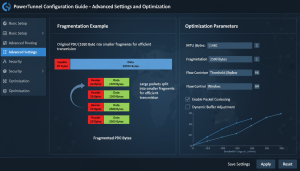
PowerTunnel modifies network packets to bypass ISP-level Deep Packet Inspection systems, helping users access restricted websites while maintaining stable and reliable.

Local Proxy Server

PowerTunnel runs as a local proxy on your device, processing traffic locally instead of routing it through external VPN servers, which helps maintain faster browsing speeds .

Cross-Platform Compatibility

PowerTunnel supports Windows, macOS, Linux, and Android, allowing users to bypass censorship and control network traffic on multiple devices with consistent functionality.

Lightweight Performance

Designed to be lightweight, PowerTunnel uses minimal system resources while still providing effective DPI bypass capabilities and smooth internet performance for everyday browsing.

Plugin System Support

PowerTunnel includes a flexible plugin system that allows additional functionality such as advanced censorship bypass techniques and customizable proxy behavior.

Secure DNS Handling

The tool supports secure DNS technologies such as DNS-over-HTTPS to improve privacy and prevent DNS-based blocking from internet service providers and network filters.

Easy Configuration

PowerTunnel provides simple configuration options that allow users to quickly set up the proxy server and start bypassing restrictions without complicated networking knowledge.

Reliable Connection

The proxy architecture ensures stable browsing sessions even in restricted environments, helping users maintain reliable internet access despite network filtering.

Open-Source Transparency

PowerTunnel is an open-source project, allowing developers and security experts to review the code, contribute improvements, and ensure transparency and trust.

How PowerTunnel Works

Traffic Interception

PowerTunnel intercepts network requests from your device and routes them through a local proxy server, allowing the tool to analyze and modify traffic before it reaches the internet.

DPI Evasion

The tool modifies packet patterns to bypass Deep Packet Inspection systems used by ISPs and governments, helping users access restricted websites without triggering filtering mechanisms.

Local Proxy Processing

PowerTunnel processes traffic locally on your device rather than sending it through remote VPN servers, maintaining faster speeds and giving users more direct control over connections.

Secure DNS Handling

The system can use secure DNS methods such as DNS-over-HTTPS to prevent DNS filtering and improve privacy when accessing websites in restricted networks.

Plugin-Based Extensions

PowerTunnel supports plugins that enhance censorship bypass techniques, allowing users to extend functionality and adapt the tool to different network restrictions.

Direct Internet Access

After traffic adjustments, requests continue to their destination normally, allowing users to browse blocked websites while keeping stable internet performance and connectivity.

Download PowerTunnel

PowerTunnel is an open-source censorship bypass and DPI evasion tool that allows users to access blocked websites by modifying network traffic patterns. It works as a lightweight local proxy and does not require root access on most supported platforms.

System Requirements

Operating System: Windows, Linux, macOS, or Android
Runtime: Java Runtime Environment (Java 11 or newer recommended)
Network Access: Internet connection for proxy routing and configuration
Permissions: Administrator rights may be required on some systems
Configuration: Optional plugins and settings for advanced bypass methods

PowerTunnel Installation Guide

Download PowerTunnel

Download the latest PowerTunnel release from the official GitHub repository to ensure you get the most secure and up-to-date version of the censorship bypass tool.

Install Java Runtime

Make sure Java is installed on your system because PowerTunnel runs on the Java platform. Install Java 11 or a newer version for stable performance .

Run PowerTunnel

Open the downloaded PowerTunnel file and launch the application. The tool will start a local proxy server that manages and modifies network traffic.

Configure Proxy Settings

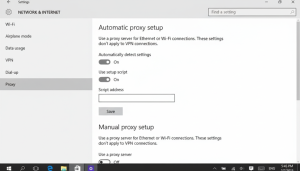
Set your browser or system proxy settings to connect through PowerTunnel so the tool can process requests and help bypass network censorship.

Guide For PowerTunnel

Learn how to install, configure, and use PowerTunnel effectively to bypass ISP-level censorship, manage proxy settings, and access restricted websites while maintaining privacy and stable internet performance.

Trusted by Internet Freedom Enthusiasts

PowerTunnel helps users bypass censorship, access restricted websites, and maintain fast, reliable internet connections without complex configuration or VPNs.

Common Questions About PowerTunnel

Find answers to the most common questions about PowerTunnel, including installation, configuration, DPI bypass technology, proxy setup, compatibility, and safe internet access on restricted networks.

PowerTunnel is an open‑source proxy tool designed to bypass ISP-level internet censorship. It helps users access blocked websites by modifying traffic patterns to avoid Deep Packet Inspection filtering.

You can install PowerTunnel by downloading the latest version from its official repository, installing Java if required, and launching the application to start the local proxy server.

Yes, PowerTunnel runs on the Java platform, so you need Java Runtime Environment installed on your system to run the application properly on desktop platforms.

No, PowerTunnel is designed to be simple and lightweight. Most users can run it easily without complex configuration, and advanced settings are optional.

Yes, beginners can use PowerTunnel because it requires minimal setup. After launching the tool, users only need to configure proxy settings in their browser.

You should download PowerTunnel from its official GitHub repository or trusted open‑source software platforms to ensure you receive the latest secure version.

PowerTunnel bypasses censorship by modifying packet behavior and traffic signatures so that Deep Packet Inspection systems cannot easily detect or block requests.

No, PowerTunnel is not a VPN. It works as a local proxy that modifies network traffic to bypass restrictions without routing all traffic through remote servers.

Yes, PowerTunnel is specifically designed to evade Deep Packet Inspection systems that many internet providers use to block access to certain websites.

Yes, PowerTunnel supports plugins that allow users to extend functionality and apply additional bypass techniques for different censorship environments.

Yes, PowerTunnel is designed to be lightweight and efficient. It uses minimal system resources while still providing effective censorship bypass functionality.

Yes, PowerTunnel can be used alongside other networking tools and browsers, allowing users to configure proxy settings for specific applications.

PowerTunnel supports multiple platforms including Windows, Linux, macOS, and Android, making it accessible for a wide range of users.

Yes, PowerTunnel provides an Android version that allows users to bypass censorship and filtering on mobile networks without requiring root access.

Yes, PowerTunnel works well on Linux distributions as long as Java is installed, allowing users to run the proxy server easily.

Yes, PowerTunnel works with most modern browsers including Chrome, Firefox, and Edge through standard proxy configuration.

In many cases it can work on restricted networks, but some enterprise firewalls may require additional configuration or plugins.

Yes, PowerTunnel can be used in different network environments, from personal devices to more complex setups with advanced configurations.

PowerTunnel is open‑source software, which allows developers and users to review its code, making it transparent and generally safe when downloaded from official sources.

PowerTunnel focuses on bypassing censorship rather than full encryption. However, it supports secure DNS options like DNS‑over‑HTTPS for improved privacy.

PowerTunnel is designed to reduce the chances of detection by modifying traffic patterns, but detection may still vary depending on network policies.

PowerTunnel typically does not store browsing history or personal data because it mainly acts as a local proxy processing traffic in real time.

PowerTunnel can improve privacy by preventing certain filtering methods and supporting secure DNS technologies that reduce DNS‑based tracking.

In many countries PowerTunnel is legal, but users should always check their local regulations regarding internet censorship bypass tools.

PowerTunnel – Secure DPI Bypass Proxy Tool

PowerTunnel is a secure DPI bypass proxy tool that ensures private, unrestricted browsing with fast, reliable and encrypted internet access. now!

Price: Free

Price Currency: $

Operating System: Windows, macOs, Linux, Andriod

Application Category: Software

Editor's Rating:
4.7
Scroll to Top